Duration
Team
Role
Jan - May 2026
Solo Project (1 UX Designer)
Program Assistant/UX Designer

The BeAM Makerspace at the University of North Carolina at Chapel Hill provides students and faculty with access to fabrication tools and equipment, including 3D printers, laser cutters, CNC machines, and embroidery machines. To prepare users to safely operate this equipment, BeAM hosts training materials, safety documentation, and instructional resources through its Canvas learning management system.
OVERVIEW
While working as a Program Assistant, I was brought onto a special project to redesign tool resource and trainings pages on BeAM's Learning Management System (LMS) after opportunities to improve their usability and organization were identified.
CHALLENGE
DISCOVERY
Qualitative Insights and Observations
Students and faculty use the engineering makerspace to complete academic and research projects involving electronics, custom fabrication, and 3D printing, often under tight deadlines for their classes.
Through observations and conversations with both new and experienced users, I found that many felt anxious about completing their projects on time. They struggled to quickly locate the training materials and safety information on the LMS website.
Important resources were buried within multiple dropdown menus, and several links to safety handbooks and equipment manuals were broken, preventing users from efficiently scanning the page and accessing critical information.


I created a user persona to synthesize my qualitative research and findings from real users of the BeAM makerspace, featuring goals, frustrations, and needs when using the space and the BeAM's LMS website.
DEFINE
From my research, I identified that the tool and training pages needed to make critical resources immediately accessible to support both safe equipment operation and efficient project completion. Key resources, such including certification steps, machine diagrams, safety requirements, and operating instructions, should be easy to find without digging through multiple menus.
I also needed to establish a clearer visual hierarchy that guided users through the certification process, highlighted required safety information, and made the steps for operating each machine easy to scan and follow.
DESIGN SOLUTION
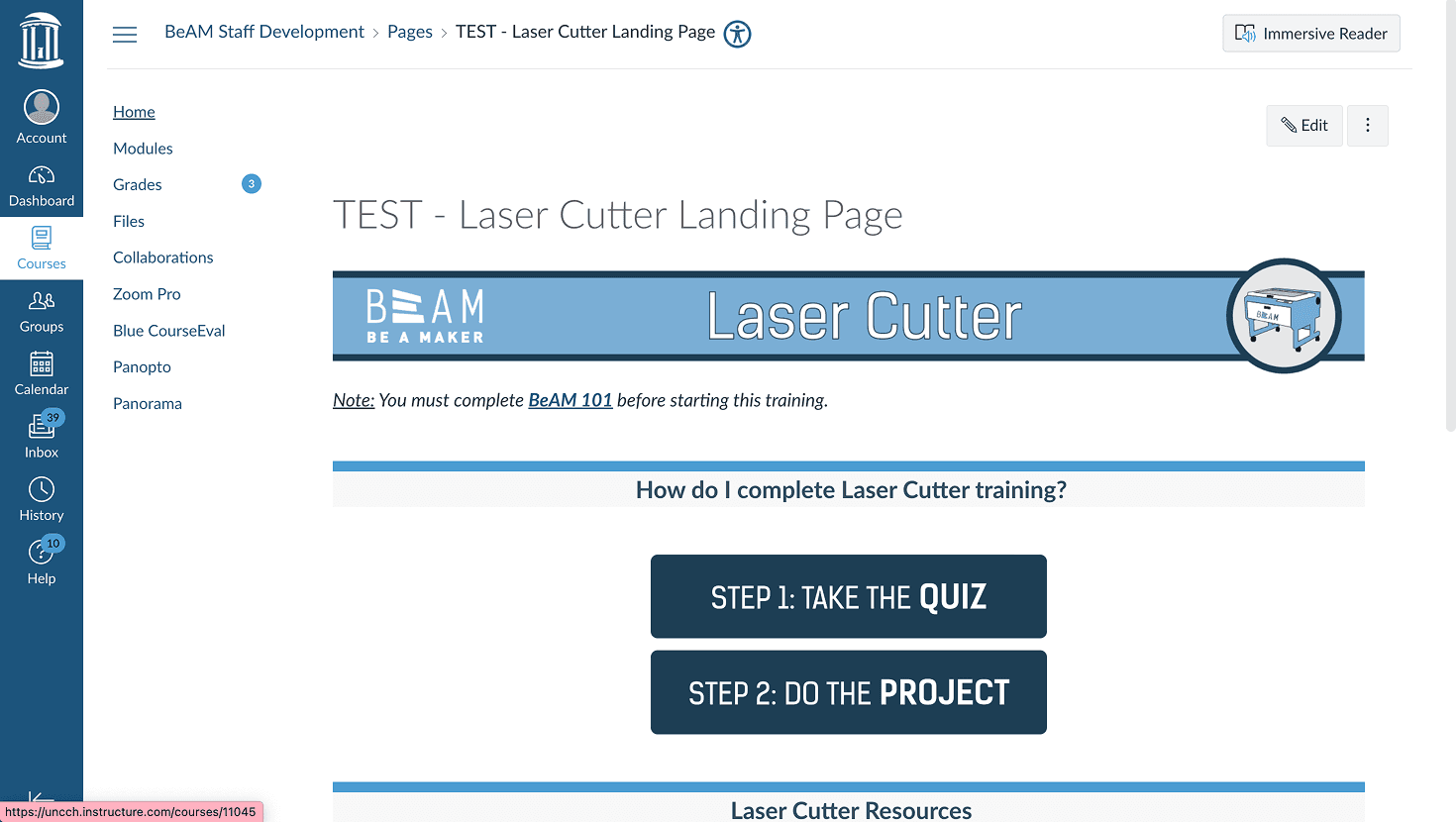
I translated these design improvements into high-fidelity Figma mockups before implementing them in HTML on BeAM's live LMS website. This allowed the redesigned pages to move directly from concept to production, improving the accessibility and usability of training resources for students and faculty.
I used Claude Design to generate wireframes to reorganize the components of a tool resource page based on my qualitative research and also the requirements from BeAM managers. I landed on this design to transition to a high-fidelity prototype.


TAKEAWAYS
This project reinforced that small usability improvements can have a significant impact on the user experience. Reorganizing information, improving visual hierarchy, and making critical resources easier to find helped reduce friction for students working under tight deadlines.
It also gave me experience taking a design from research to implementation. I translated my designs into HTML and deployed them on the live LMS, giving me a deeper appreciation for designing with real technical constraints in mind.
Role
Team
Duration
Program Assistant/UX Designer
Solo Project (1 UX Project)
Jan - May 2026
The BeAM Makerspace at the University of North Carolina at Chapel Hill provides students and faculty with access to fabrication tools and equipment, including 3D printers, laser cutters, CNC machines, and embroidery machines. To prepare users to safely operate this equipment, BeAM hosts training materials, safety documentation, and instructional resources through its Canvas learning management system.
OVERVIEW
While working as a Program Assistant, I was brought onto a special project to redesign tool resource and trainings pages on BeAM's Learning Management System (LMS) after opportunities to improve their usability and organization were identified.
CHALLENGE
Qualitative Insights and Observations
Students and faculty use the engineering makerspace to complete academic and research projects involving electronics, custom fabrication, and 3D printing, often under tight deadlines for their classes.
Through observations and conversations with both new and experienced users, I found that many felt anxious about completing their projects on time. They struggled to quickly locate the training materials and safety information on the LMS website.
Important resources were buried within multiple dropdown menus, and several links to safety handbooks and equipment manuals were broken, preventing users from efficiently scanning the page and accessing critical information.
DISCOVERY
DEFINE
From my research, I identified that the tool and training pages needed to make critical resources immediately accessible to support both safe equipment operation and efficient project completion. Key resources, such including certification steps, machine diagrams, safety requirements, and operating instructions, should be easy to find without digging through multiple menus.
I also needed to establish a clearer visual hierarchy that guided users through the certification process, highlighted required safety information, and made the steps for operating each machine easy to scan and follow.
DESIGN SOLUTION
I used Claude Design to generate wireframes to reorganize the components of a tool resource page based on my qualitative research and also the requirements from BeAM managers. I landed on this design to transition to a high-fidelity prototype.
I translated these design improvements into high-fidelity Figma mockups before implementing them in HTML on BeAM's live LMS website. This allowed the redesigned pages to move directly from concept to production, improving the accessibility and usability of training resources for students and faculty.
TAKEAWAYS
This project reinforced that small usability improvements can have a significant impact on the user experience. Reorganizing information, improving visual hierarchy, and making critical resources easier to find helped reduce friction for students working under tight deadlines.
It also gave me experience taking a design from research to implementation. I translated my designs into HTML and deployed them on the live LMS, giving me a deeper appreciation for designing with real technical constraints in mind.